MicroPython · current
MicroPython
Lean implementation of Python 3 for microcontrollers, with an interactive REPL, a 'machine' module for hardware access, and documented ports including ESP32 and Raspberry Pi RP2xxx (Pico).
Evidence: Inferred 7 sources · latest retrieved 2026-10-18 · audited
Key specs
- Language
- Python 3 implementation (small subset of the Python standard library) Evidence: Documented
- Minimum footprint
- 256k code space and 16k RAM Evidence: Documented
- Interactive prompt
- REPL Evidence: Documented
- Documented ports
- pyboard, ESP8266, ESP32, PSOC Edge, RP2xxx, NXP i.MXRT 10xx, WiPy/CC3200, Unix and Windows, Zephyr, Renesas RA, SAMD21/SAMD51 Evidence: Documented
- Docs last updated
- 2026-10-16 Evidence: Documented
Works with
-
Works with
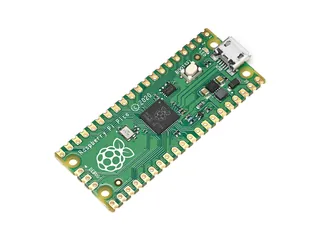
Raspberry Pi Pico (RP2040)
Evidence: Documented
MicroPython documents an RP2xxx port; the Pico datasheet points to MicroPython for getting code running on Pico.
-
Works with
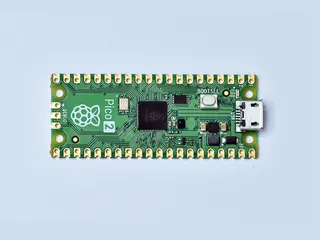
Raspberry Pi Pico 2
Evidence: Documented
The Pico 2 datasheet points to MicroPython for getting code running on Pico 2.
-
Works with
ESP32-DevKitC
Evidence: Inferred
MicroPython documents an ESP32 port (Espressif ESP32 development board image); the ESP32-DevKitC is not named on the page, so this is an inference.
-
Suggested for: Log temperature over Wi-Fi, Read an analog sensor with a Raspberry Pi, Compare boards: documented capabilities
All specifications 5
| Spec | Value | Evidence |
|---|---|---|
| Language | Python 3 implementation (small subset of the Python standard library) | Evidence: Documented |
| Minimum footprint | 256k code space and 16k RAM "fit and run within just 256k of code space and 16k of RAM" | Evidence: Documented |
| Interactive prompt | REPL | Evidence: Documented |
| Documented ports | pyboard, ESP8266, ESP32, PSOC Edge, RP2xxx, NXP i.MXRT 10xx, WiPy/CC3200, Unix and Windows, Zephyr, Renesas RA, SAMD21/SAMD51 Platform quick-reference sections listed on the documentation home page | Evidence: Documented |
| Docs last updated | 2026-10-16 | Evidence: Documented |
Caveats
Documentation is for the 'latest' development branch, which the page says may refer to features not in released versions. The version list on the docs page was read as text; the release dates of individual versions were not captured. Per-board support for particular boards (beyond the Pico, Pico 2 datasheet mentions) was not checked. The ESP32 relation is an inference because the DevKitC is not named.
Claims 7
MicroPython is an implementation of Python 3 with a small subset of the standard library, optimised for microcontrollers and constrained environments, and can fit and run within 256k of code space and 16k of RAM. Evidence: Documented
Source: src-mp-site
MicroPython provides an interactive prompt (REPL) and a "machine" module for low-level hardware access. Evidence: Documented
Source: src-mp-site
The MicroPython documentation (last updated 16 Oct 2026) has quick references for ports including ESP32, Raspberry Pi RP2xxx, Renesas RA, pyboard, ESP8266, Zephyr and others. Evidence: Documented
Source: src-mp-docs
On ESP32 and on Wi-Fi-equipped RP2 boards (the RP2 page names Pico W and Pico 2 W), MicroPython provides the network.WLAN class for station and access-point Wi-Fi interfaces. Evidence: Documented
Source: src-mp-wlan
On the ESP32 port, ADC block 2 is also used by Wi-Fi: reading block 2 pins while Wi-Fi is active raises an exception, per the MicroPython ESP32 quick reference. Evidence: Documented
Source: src-mp-esp32
MicroPython documents hardware I2C through the machine.I2C class on both the ESP32 port (two hardware I2C peripherals) and the RP2 port. Evidence: Documented
Source: src-mp-esp32
The Raspberry Pi Pico and Pico 2 datasheets each point readers to MicroPython (via the Pico-series Python SDK book) as a way to get code running on the board. Evidence: Documented
Source: src-mp-pico
Sources 7
-
MicroPython project · manufacturer_docs
Locator: Home page: intro and "Proper Python with hardware-specific modules" · Retrieved 2026-10-18
MicroPython is a lean and efficient implementation of the Python 3 programming language that includes a small subset of the Python standard library and is optimised to run on microcontrollers and in constrained environments. | it is compact enough to fit and run within just 256k of code space and 16k of RAM. | You get an interactive prompt (the REPL) | modules such as "machine" for accessing low-level hardware.
-
MicroPython project · manufacturer_docs
https://docs.micropython.org/en/latest/index.html
Locator: Documentation home: ports list and versions · Retrieved 2026-10-18
Welcome! This is the documentation for MicroPython, last updated 16 Oct 2026. | Quick reference for the ESP32 | Quick reference for the Raspberry Pi RP2xxx | Quick reference for the Renesas RA | v1.29.0
-
MicroPython project · manufacturer_docs
https://docs.micropython.org/en/latest/rp2/quickref.html
Locator: RP2 quick reference: WLAN; ADC; Hardware I2C bus · Retrieved 2026-10-18
This section applies only to devices that include WiFi support, such as the Pico W and Pico 2 W | The standard ADC range is 0-3.3V. | The driver is accessed via the machine.I2C class
-
MicroPython project · manufacturer_docs
https://docs.micropython.org/en/latest/esp32/quickref.html
Locator: ESP32 quick reference: WLAN; ADC; Hardware I2C bus · Retrieved 2026-10-18
The network.WLAN class in the network module: | ADC block 2 is also used by WiFi and so attempting to read analog values from block 2 pins when WiFi is active will raise an exception. | There are two hardware I2C peripherals with identifiers 0 and 1.
-
MicroPython project · manufacturer_docs
https://docs.micropython.org/en/latest/library/network.WLAN.html
Locator: network.WLAN class description · Retrieved 2026-10-18
class WLAN - control built-in WiFi interfaces | This class provides a driver for WiFi network processors.
-
Raspberry Pi Ltd · datasheet
https://datasheets.raspberrypi.com/pico/pico-datasheet.pdf
Locator: Pico datasheet, Getting started tip · Retrieved 2026-10-18
See the Raspberry Pi Pico-series Python SDK book to get started with MicroPython, which is the fastest way to get code running on Pico.
-
Raspberry Pi Ltd · datasheet
https://datasheets.raspberrypi.com/pico/pico-2-datasheet.pdf
Locator: Pico 2 datasheet, Getting started tip · Retrieved 2026-10-18
See the Raspberry Pi Pico-series Python SDK book to get started with MicroPython, which is the fastest way to get code running on Pico 2.