Arduino · current
Arduino IDE
Arduino's desktop programming environment for writing sketches and uploading them to Arduino boards; IDE 2.x is open source and adds autocompletion, code navigation and a debugger, with Serial Monitor, Serial Plotter, library and board managers.
Evidence: Inferred 6 sources · latest retrieved 2026-10-18 · audited
Key specs
- Current version
- 2.3.10 Evidence: Documented
- Legacy version
- 1.8.19 Evidence: Documented
- Architecture
- IDE 2.x built on the Theia IDE framework and Electron; compile/upload backend is an arduino-cli daemon Evidence: Documented
- License
- GNU AGPLv3 (repository code and executable distributions) Evidence: Documented
- Editor features
- Autocompletion, code navigation, live debugger Evidence: Documented
- Built in tools
- Serial Monitor, Serial Plotter, library manager, board manager Evidence: Documented
Works with
-
Works with
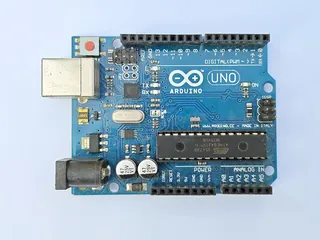
Arduino UNO R3
Evidence: Documented
UNO R3 datasheet section 4.1: install the Arduino Desktop IDE to program the board while offline.
-
Works with
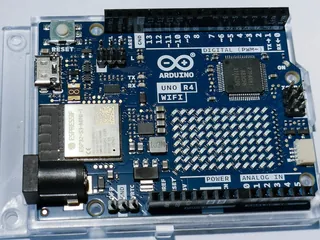
Arduino UNO R4 WiFi
Evidence: Documented
UNO R4 WiFi datasheet section 14.1: install the Arduino Desktop IDE to program the board while offline.
-
Works with
Arduino Nano ESP32
Evidence: Documented
Manual 14.1: offline programming uses the Arduino IDE.
Suggested for: Log temperature over Wi-Fi, Compare boards: documented capabilities
All specifications 7
| Spec | Value | Evidence |
|---|---|---|
| Current version | 2.3.10 Version listed on the software page on the retrieval date; changes with releases | Evidence: Documented |
| Legacy version | 1.8.19 "Legacy IDE (1.8.19)" is also offered | Evidence: Documented |
| Architecture | IDE 2.x built on the Theia IDE framework and Electron; compile/upload backend is an arduino-cli daemon | Evidence: Documented |
| License | GNU AGPLv3 (repository code and executable distributions) | Evidence: Documented |
| Editor features | Autocompletion, code navigation, live debugger | Evidence: Documented |
| Built in tools | Serial Monitor, Serial Plotter, library manager, board manager Documentation pages exist for each tool | Evidence: Documented |
| Online alternative | Arduino Cloud Editor (browser-based) | Evidence: Documented |
Caveats
Operating-system support for IDE 2.x was not stated in the text of the pages read (the Windows 'Win 7 and newer' line on the software page belongs to the legacy 1.8.19 listing), so no OS list is recorded. Version number is as listed on the retrieval date and changes with releases. The tutorial page on downloading and installing IDE 2 could not be read as text and is not used.
Claims 7
Arduino IDE 2.3.10 is listed on arduino.cc as the new major release of the IDE, with autocompletion, code navigation and a live debugger; the legacy IDE 1.8.19 is still offered for download. Evidence: Documented
Source: src-aide-software
Arduino IDE 2.x is a rewrite of IDE 1.x that shares no code with it; it is based on the Theia IDE framework and Electron, and compiling and uploading are done by an arduino-cli instance running in daemon mode. Evidence: Documented
Source: src-aide-readme
The Arduino IDE 2.x source code is open source on GitHub; the repository code and executable distributions are licensed under GNU AGPLv3. Evidence: Documented
Source: src-aide-readme
Arduino documents IDE 2 tools including the Serial Monitor, the Serial Plotter, a library manager, a board manager and uploading and debugging features. Evidence: Documented
Source: src-aide-docs
Arduino sketches use the Arduino programming language, which Arduino's Language Reference divides into functions, values (variables and constants) and structure; its function list includes analogRead() and a Wi-Fi library. Evidence: Documented
Source: src-aide-lang
The UNO R3 and UNO R4 WiFi datasheets each tell the reader to install the Arduino Desktop IDE to program the board while offline. Evidence: Documented
Source: src-aide-uno3
Arduino also offers the Arduino Cloud Editor, described as the Arduino IDE online, usable from a browser. Evidence: Documented
Source: src-aide-software
Sources 6
-
Arduino · manufacturer_docs
https://www.arduino.cc/en/software/
Locator: Arduino IDE section of the software page · Retrieved 2026-10-18
Arduino IDE 2.3.10 | The new major release of the Arduino IDE is faster and even more powerful! | it features autocompletion, code navigation, and even a live debugger. | The Arduino IDE 2.0 is open source and its source code is hosted on GitHub | Legacy IDE (1.8.19) | Arduino Cloud Editor | Experience the Arduino IDE online.
-
Arduino · manufacturer_docs
https://raw.githubusercontent.com/arduino/arduino-ide/main/README.md
Locator: README.md of github.com/arduino/arduino-ide · Retrieved 2026-10-18
The Arduino IDE 2.x is a major rewrite, sharing no code with the IDE 1.x. | It is based on the [Theia IDE](https://theia-ide.org/) framework and built with [Electron](https://www.electronjs.org/). | The backend operations such as compilation and uploading are offloaded to an [arduino-cli](https://github.com/arduino/arduino-cli) instance running in daemon mode. | The code contained in this repository and the executable distributions are licensed under the terms of the GNU AGPLv3.
-
Arduino · manufacturer_docs
https://docs.arduino.cc/software/ide/
Locator: Software > Arduino IDE documentation index · Retrieved 2026-10-18
Using the Serial Monitor tool | Using the Serial Plotter Tool | Installing libraries | Installing a Board Package in the IDE 2 | How to upload a sketch with the Arduino IDE 2 | Debugging with the Arduino IDE 2
-
Arduino · manufacturer_docs
https://docs.arduino.cc/language-reference/
Locator: Language Reference index · Retrieved 2026-10-18
Arduino programming language can be divided in three main parts: functions, values (variables and constants), and structure. | analogRead() | Wi-Fi
-
Arduino · datasheet
https://docs.arduino.cc/resources/datasheets/A000066-datasheet.pdf
Locator: Arduino UNO R3 datasheet, section 4.1 Getting Started - IDE · Retrieved 2026-10-18
If you want to program your UNO R3 while offline you need to install the Arduino Desktop IDE
-
Arduino · datasheet
https://docs.arduino.cc/resources/datasheets/ABX00087-datasheet.pdf
Locator: Arduino UNO R4 WiFi datasheet, section 14.1 Getting Started - IDE · Retrieved 2026-10-18
If you want to program your UNO R4 WiFi while offline you need to install the Arduino Desktop IDE